
Automation plays a structural role in how high-performing companies integrate systems, process data, and scale digital operations. As businesses seek to optimize processes at a deeper level, workflow tools have gained prominence. However, not all of them offer the same level of control, flexibility, and technical depth. This is precisely where n8n workflows differentiate themselves from conventional automation tools.
Instead of functioning as simple visual automations, n8n workflows act as intelligent orchestration layers that connect APIs, structured data, and business rules within a single execution environment. They operate as a centralized logic layer between systems.
Throughout this article, you will understand how n8n workflows function, how their architecture differs from other platforms in the market, and why n8n has become a strategic choice for both technical teams and business areas that need more than basic automation.
What is n8n?
N8n is an open-source workflow automation platform designed to connect systems, data, and services through highly configurable visual flows. In practice, it functions as an orchestration layer between applications. It receives events, processes information, applies business rules, and executes actions automatically.
Unlike purely no-code automation tools, n8n was built with scale, control, and extensibility in mind. It provides a visual editor based on nodes while also offering native JavaScript support. This dual model allows visual simplicity without sacrificing technical depth.
As a result, n8n supports both non-technical users building straightforward automations and engineering teams implementing advanced logic in more complex scenarios.
What makes the platform stand out?
One of n8n's main differentiators is its self-hosted model. The platform can run within the company's own infrastructure, ensuring full control over data, credentials, and execution costs.
This becomes critical for organizations handling sensitive data, operating under compliance requirements, or managing high execution volumes where traditional SaaS solutions tend to scale cost alongside complexity.
In practical terms, n8n is used to:
Integrate CRMs, ERPs, databases, and external APIs
Automate Marketing, Sales, Support, and Operations processes
Process webhooks and real-time events
Build data pipelines and AI-driven automations
Replace isolated scripts with reusable and versioned workflows
More than a tactical automation tool, n8n positions itself as a workflow infrastructure capable of evolving with a company's technical maturity.
How n8n works in practice
In n8n, a workflow represents the visual and logical structure of an automated process. It consists of a trigger, a sequence of nodes, and rules that define how data flows between them. Unlike linear automations, a workflow in n8n behaves like a distributed mini-system.
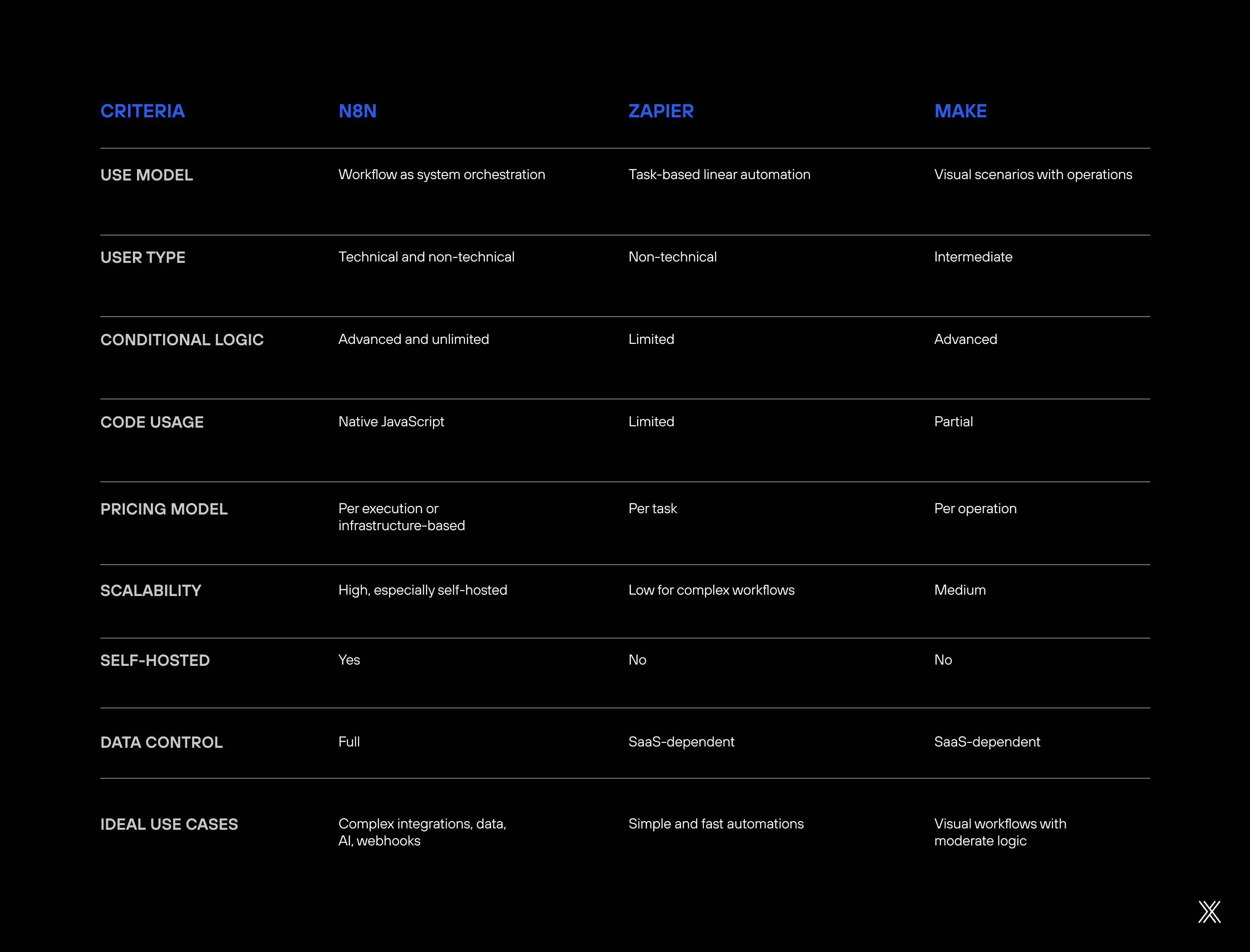
It receives events, processes structured information, makes decisions, and executes actions based on contextual business logic.
Triggers: The starting point
Every workflow begins with a trigger responsible for defining when execution should occur. This trigger can be a webhook receiving external data, a scheduled cron job, a database update, or an event fired by another application. The trigger defines the execution lifecycle of the workflow.
Once activated, the workflow executes its subsequent steps automatically and sequentially.
Nodes: Actions and flow logic
After the trigger, the workflow moves through a chain of nodes. Each node performs a specific function, such as consuming APIs, querying CRMs, sending notifications, validating conditions, or transforming data. Each node is modular but context-aware within the flow.
Although nodes execute isolated tasks, they remain connected to the broader execution context, ensuring continuity across the workflow.
Non-linear flows and execution control
One of the structural advantages of n8n workflows lies in how nodes connect. A workflow does not need to follow a single linear path. It can include conditional branches, parallel executions, data merges, and controlled loops. This allows n8n to represent real-world operational complexity.
Such flexibility is particularly valuable in Marketing, Sales, Product, and Data operations, where exceptions and conditional logic are common.
Data as a central element
In n8n, data is treated as a first-class entity. Each node receives structured JSON input, processes it, and generates output that can be reused in subsequent steps. This JSON-based architecture improves traceability and maintainability over time.
Because data is explicit and structured, workflows remain adaptable and easier to debug as they evolve.
Code as an extension of visual logic
When visual configuration is insufficient, code nodes allow developers to write JavaScript directly within the workflow. This enables advanced data manipulation, complex validations, and non-standard integrations. JavaScript extends the visual model without breaking architectural cohesion.
By keeping custom logic inside the workflow, teams avoid fragmentation caused by external scripts.
From simple automation to system orchestration
In practice, an n8n workflow can range from a simple alert triggered by a new lead to a robust integration pipeline connecting multiple systems, applying business rules, handling errors, and managing execution states. This scalability is what transforms n8n from an automation tool into an orchestration layer.
As complexity increases, the same environment supports growth without requiring a platform shift.
N8n vs Zapier vs Make: When each platform makes sense
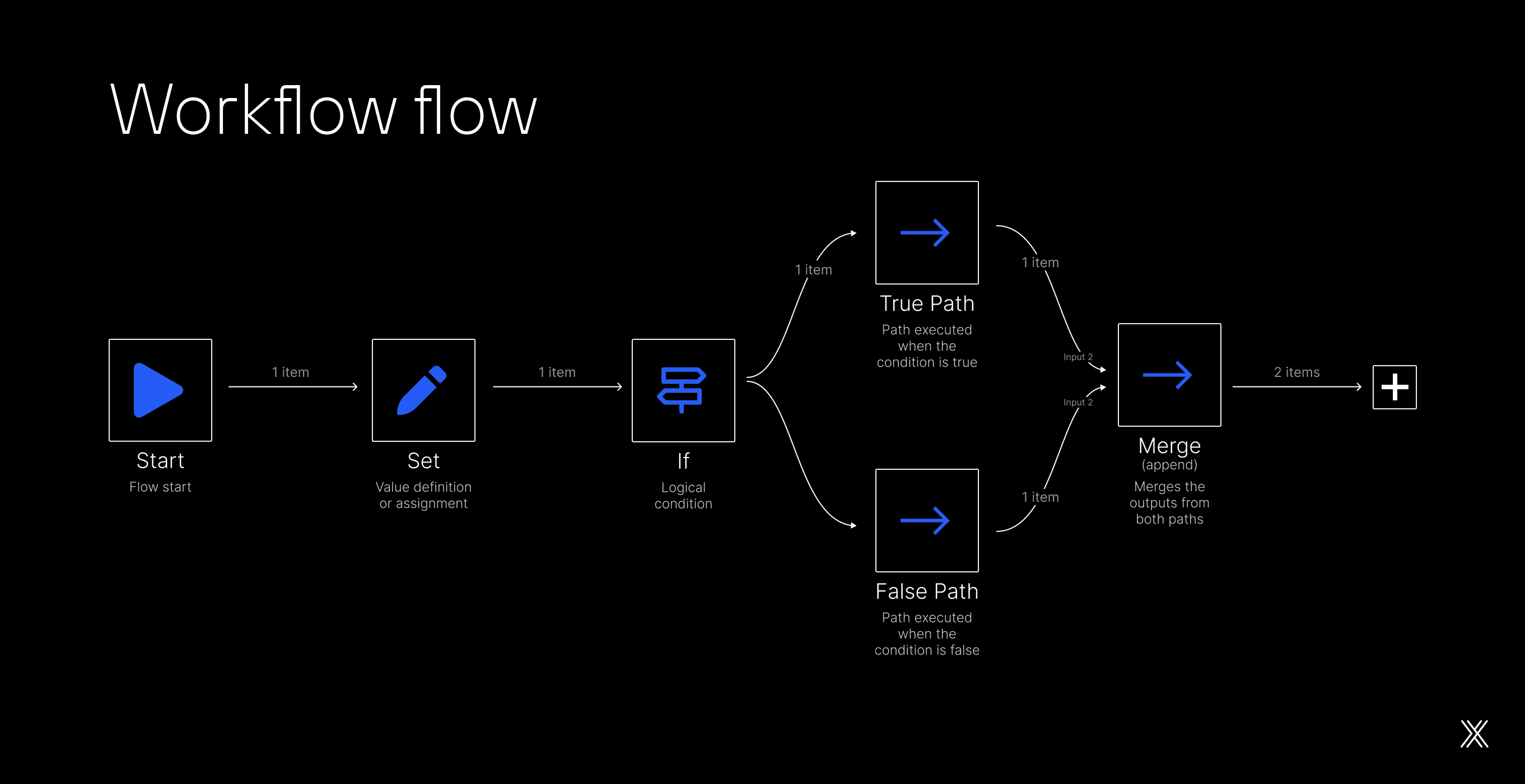
When it comes to workflow automation, n8n, Zapier, and Make may appear similar on the surface. In practice, however, their approaches are structurally different. Choosing between them is not just a technical decision. It involves cost structure, data control, workflow complexity, and team maturity.
Zapier
Zapier has established itself as the entry point into automation. Its linear logic, based on 'trigger + actions' is simple to understand and quick to implement. It is optimized for speed and accessibility. This makes it effective for short, predictable, low-conditional flows, especially within Marketing, Sales, and Operations teams that do not rely on continuous technical support.
The limitation becomes visible as workflows grow. Each additional step increases cost, logic becomes harder to maintain, and the task-based pricing model penalizes more robust flows. Scalability quickly becomes expensive.
Make
Make occupies an interesting middle ground. Its diagram-style visual editor makes it easier to create scenarios with branching, filters, and error handling. It provides more expressive flow modeling than Zapier.
Make works well for intermediate users who need richer logic but still prefer a fully managed environment.
However, its operation-based pricing model and lack of self-hosting impose constraints when execution volume increases or stricter compliance requirements apply. Flexibility exists, but cost and governance limitations remain.
N8n
This is where n8n differentiates itself structurally. Instead of focusing solely on ease of onboarding, it was designed as automation infrastructure. n8n workflows function as executable business logic pipelines.
They combine a visual editor, structured JSON data control, and native JavaScript support. This allows teams to build both simple automations and complex architectures within the same environment, without switching platforms as maturity increases.
Another decisive factor is the execution model. While Zapier and Make charge per task or operation, self-hosted n8n does not impose software-level execution limits. Costs are tied to infrastructure, not workflow complexity.
For companies processing large volumes of events, webhooks, or structured data, this fundamentally changes the economic equation.
Additionally, n8n stands out in data-sensitive environments. Running the platform within your own infrastructure removes third-party dependency for processing critical information. This makes n8n a natural fit for regulated industries and mission-critical digital products.
In short, Zapier delivers speed, Make improves visual structure, and n8n sustains scale, advanced logic, and full data control. As automation maturity increases, organizations often move naturally in that direction.
Comparison table
Best practices for building scalable n8n workflows
Creating n8n workflows is simple at first. Scaling them without chaos is another challenge. Scalability requires architectural thinking, not improvisation.
The best practices below help maintain performance, clarity, and security as workflows grow in complexity and execution volume.
Think of the workflow as architecture, not a shortcut
Before dragging nodes onto the canvas, define the logic. Clarify inputs, rules, exceptions, and outputs. Successful workflows start with clear scope definition. This prevents patchwork fixes later and reduces hidden dependencies.
Separate responsibilities into smaller workflows
Avoid monolithic flows. When a single workflow does everything, testing and maintenance become difficult. Instead, compose workflows: one receives the event, another validates data, another executes actions. Use internal webhooks or triggers to connect them. This mirrors microservices principles applied to automation.
Filter early, process less
Data consumes processing power. Use If nodes and filters immediately after the trigger to discard irrelevant events. Processing less data improves performance and predictability. In high-volume environments, this detail has a measurable impact.
Treat errors as part of the flow
Do not assume everything will work. Include explicit error handling, alternative failure paths, controlled retries, logging, and alerts. A workflow without error handling becomes unstable in production.
Standardize naming and documentation
Name workflows, nodes, and variables intentionally. Comments are not optional in critical flows. Readable workflows reduce onboarding time and operational risk.
Version and test before activation
Use manual executions and test data before activating workflows in production. In larger environments, maintain separate active and editing versions to avoid modifying critical flows directly. Versioning protects operational stability.
Monitor like a product, not a script
Track executions, response time, and failures. Workflows are operational assets. Treat them as part of the technical stack, not disposable automation.
Common mistakes when creating n8n workflows
As n8n adoption grows, recurring error patterns emerge. They usually do not appear in early experimentation but surface once automation becomes operationally critical. Identifying these patterns early prevents silent failures and costly rework.
Treating the workflow as a disposable script
A frequent mistake is building workflows as temporary scripts. This leads to poor structure, a lack of documentation, and limited evolution capacity. n8n is not just a task runner. It works best when workflows are designed as system components.
Concentrating too much logic in a single flow
Large workflows with dozens of interconnected nodes may seem efficient at first, but quickly become fragile. Any change requires retesting everything. Breaking complex flows into smaller connected units reduces risk and improves maintainability. Modularity increases resilience.
Ignoring error handling and exceptions
Many workflows assume ideal conditions. APIs fail, data arrives incomplete, and integrations change. Without defined error paths, failures go unnoticed or interrupt critical processes. Error handling should be expected, not optional.
Executing heavy logic without control
Uncontrolled loops, excessive API calls, and unnecessary data processing often cause performance degradation. Without early filtering and execution limits, workflows consume resources inefficiently. Scaling requires processing less, not more.
Spreading transformations across too many visual nodes
When every minor data adjustment becomes a separate visual node, the workflow loses clarity. In complex scenarios, this reduces readability and maintainability. Centralizing critical transformations within code nodes often produces cleaner flows. Strategic consolidation improves structure.
Failing to version or test changes
Editing live workflows directly in production introduces real risk. Without testing and version control, small changes can break critical flows. The correct approach is validating updates through manual runs or isolated environments before publishing. Testing is a safeguard, not a delay.
Underestimating observability
Without logs, alerts, and execution metrics, workflows become black boxes. Failures only surface when users complain. Monitoring executions and errors is what distinguishes reliable automation from improvisation. Observability defines operational trust.
The turning point
When these mistakes are consistently avoided, n8n stops being perceived as a simple automation tool and starts functioning as integration and orchestration infrastructure. This is the point where the platform's real strategic value emerges.
When does n8n become part of product architecture?
In more mature projects, N8n stops being just a tool for automating isolated tasks and begins to assume a structural role within digital architecture. This shift happens when workflows are no longer created merely for operational efficiency, but to orchestrate integrations, events, and business rules across systems. Automation moves from tactical support to architectural responsibility.
At this stage, N8n functions as an intermediary layer between applications. It receives events, validates data, applies logic, determines execution paths, and triggers services without requiring each system to directly know the others. The result is a more decoupled, flexible, and evolvable architecture, particularly in environments with multiple products, APIs, and data sources.
Another clear sign of this transition is when N8n begins to centralize rules that change frequently. Instead of hardcoding everything directly in the backend, part of the logic lives inside workflows, where adjustments can be made faster, with lower risk and greater visibility. This is especially common in onboarding flows, pricing rules, campaigns, synchronization processes, and event handling scenarios.
The self-hosted model reinforces this architectural role. Running N8n within internal infrastructure turns automation into a core stack component, with full control over data, authentication, scalability, and cost management. Growth becomes governed by technical and business decisions rather than SaaS-imposed limits.
In practice, companies that reach this level use N8n to:
Orchestrate events between microservices
Integrate legacy systems with modern products
Process webhooks at scale
Centralize mission-critical business automations
Build governed data and AI pipelines
When this happens, n8n is no longer perceived as an "automation tool." It becomes recognized as an integration and orchestration infrastructure aligned with product architecture and business strategy.
Conclusion
N8n workflows represent a clear evolution in the concept of automation. Instead of rigid and limited flows, the platform enables teams to design intelligent, adaptable, and scalable processes by combining visual logic, code, and full data control. Automation becomes programmable architecture rather than isolated task execution.
Throughout this article, it becomes evident that N8n differentiates itself by treating automation as architecture, not as a shortcut. When properly implemented, it reduces system coupling, improves governance, controls operational costs, and expands the ability to evolve products and operations without rewriting core systems.
For organizations that need to move beyond basic automation, connect systems intelligently, and maintain control over logic and data, n8n consolidates itself as one of the most complete and strategically positioned platforms in the automation market.