
Imagine the following scenario: your company’s website was built on WordPress, and in the beginning, everything worked very well. After a few years, however, the platform began to show issues, including plugin overload and incompatibility, low security, slow page publishing, and difficulty scaling. The reality is that the website no longer keeps up with the business. The only solution? A CMS migration.
But what exactly does that mean? Migrating a CMS means moving the entire content infrastructure of a website: pages, assets, metadata, integrations, and publishing workflows. However, when this process is not properly planned, the impacts show up quickly: SEO loss, broken integrations, UX regressions, and operational instability are among the most common risks.
On the other hand, when executed correctly, a CMS migration addresses structural problems that have been holding back digital evolution. It allows organizations to reorganize the content model, reduce technical dependency for publishing, improve performance, and prepare the architecture for multiple channels.
In this article, you will understand how a CMS migration works in practice, what the critical steps of the process are, and how modern platforms, such as Acquia, help companies carry out this type of transformation with security and scalability.
Talk to a specialist about your CMS migration
When Is It Worth Doing a CMS Migration?
The decision to migrate a CMS, in most companies, arises when structural limitations begin to affect the business’s digital evolution. As the website and the digital ecosystem grow, the CMS stops being just a publishing tool and starts acting as the central infrastructure for content, integration, and digital experience. When this foundation does not keep up with new demands, technical and operational bottlenecks emerge.
- Excessive dependence on development for editorial tasks: small layout changes, page creation, or content adjustments require constant technical support, reducing the autonomy of marketing and growth teams;
- Difficulty integrating with other systems: the CMS does not efficiently connect with CRM, marketing tools, analytics, APIs, and enterprise systems, fragmenting digital operations;
- Scalability and performance limitations: the platform begins to struggle with traffic growth, portal expansion, or increased content volume;
- Rigid or poorly reusable content structure: the content model depends on fixed pages or templates, making reuse across different digital channels difficult;
- High operational maintenance costs: the CMS requires significant investment in licenses, infrastructure, or specialized technical roles to keep running.
When these factors start impacting publishing speed, integration capacity, and scalability of digital operations, CMS migration becomes more than a technological change—it becomes a strategic decision.
How Does a CMS Migration Work in Practice?
A CMS migration is conducted as a digital architecture project. The goal is not just to transfer content between systems, but to rebuild the foundation that supports the website’s editorial, technical, and integration operations. For this reason, it usually involves structural diagnostics, content modeling redesign, data migration, and reimplementation of critical integrations.
This process involves multiple technical layers, beyond page transfer and the preservation (or improvement) of SEO. In enterprise environments, the CMS is typically integrated into an ecosystem of applications, services, and operational processes, which makes migration a systems engineering project. Ignoring these dimensions can lead to functional regressions, data inconsistencies, or operational interruptions after launch.
Below are the main technical aspects that need to be evaluated during this type of project.
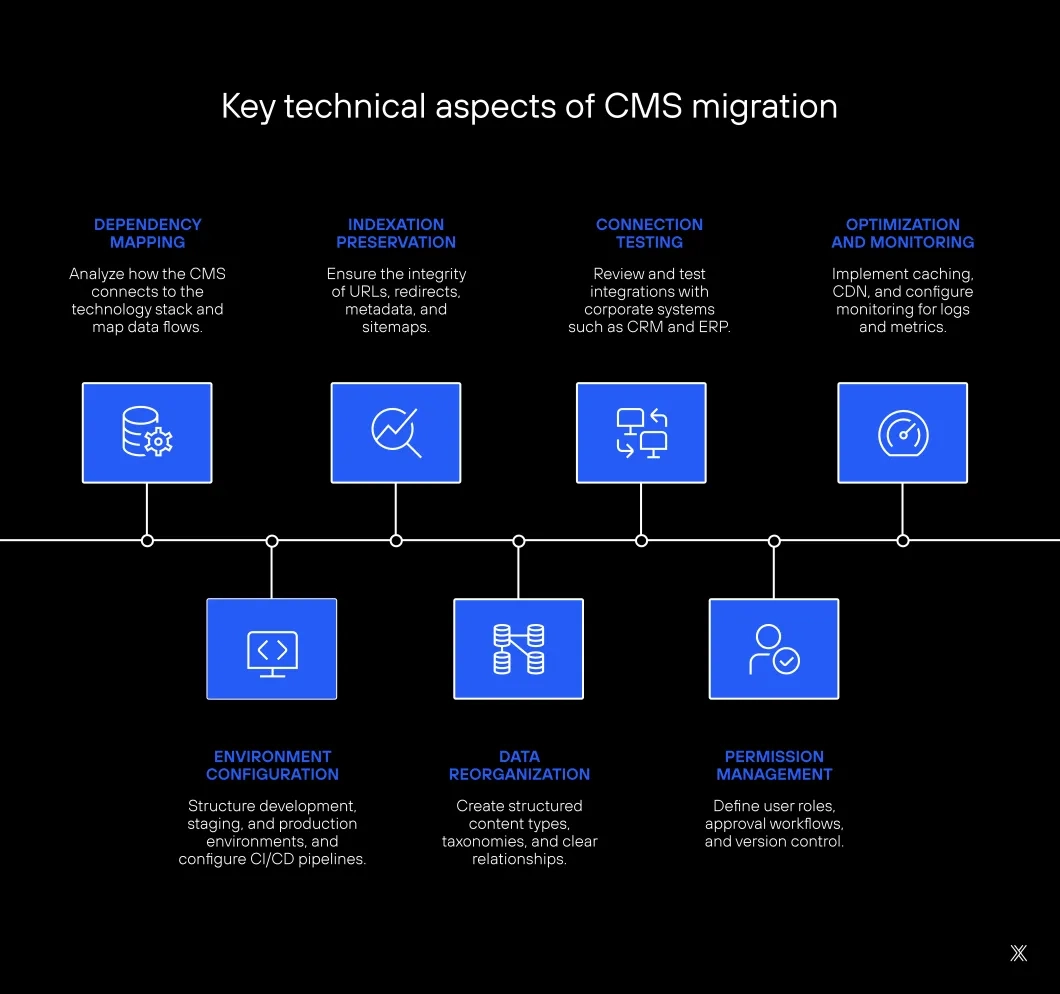
Application architecture and system dependencies – analyze how the CMS connects to the rest of the technology stack, including APIs, microservices, authentication, search, marketing automation, and analytics. All dependencies and data flows must be mapped and reimplemented to avoid functionality breakdowns after go-live;
Infrastructure, environments, and deployment pipeline – ensure that the new CMS operates on infrastructure compatible with availability, security, and scalability requirements. This includes structuring development, staging, and production environments, as well as CI/CD pipelines to automate build, testing, and deployment;
Technical SEO and indexation preservation – maintain the integrity of the site’s indexation structure, including URLs, 301 redirects, metadata, canonicals, structured data, and sitemaps. Even small inconsistencies in these elements can result in loss of indexation and a drop in organic traffic;
Content modeling and data structure – review how content is stored in the CMS, creating structured content types, consistent taxonomies, and clear relationships between entities. This reorganization enables content reuse, API integration, and multi-channel distribution;
Integrations and external services – review and test integrations with enterprise systems such as CRM, marketing platforms, search engines, financial systems, and ERPs. Changes in the CMS may affect endpoints, data formats, and authentication rules;
Editorial governance and permission control – structure user roles, approval workflows, versioning, and change traceability within the CMS. These mechanisms ensure that multiple teams can publish content in a controlled and auditable way;
Performance, caching, and observability – implement caching strategies, CDN, and loading optimizations to ensure performance. It is also necessary to configure monitoring for logs, errors, and performance metrics to quickly identify regressions after migration.
What Are the Types of CMS Migration?
Not every CMS migration involves simply replacing one platform with another equivalent one. In many cases, the project represents a shift in the website’s digital architecture, whether to improve content governance, integrate new systems, or prepare operations for multiple digital channels. Among the most common models are:
Migration between traditional CMS platforms
In this scenario, a monolithic CMS is replaced by another with a similar architecture, maintaining centralized content management. The motivation is usually to improve security, editorial governance, or system customization capabilities.
A common example is migrating from WordPress to Drupal in institutional or corporate portals that have grown in complexity and require more granular permission control, multiple content types, and integration with enterprise systems.
Migration to a headless architecture
Here, the CMS acts only as a structured content repository, while the website interface is developed separately as a frontend application. This approach allows content to be distributed via API across different digital channels.
A typical scenario occurs when companies migrate from a traditional CMS to a headless solution like Contentful, combining the CMS with modern frontend frameworks. This allows the same content to be reused across websites, applications, and other digital interfaces.
Migration to digital experience platforms (DXP)
In this model, the CMS becomes part of a broader digital experience platform, integrating content management with user data, personalization, and marketing automation.
This happens, for example, when a company migrates from a traditional CMS to a platform like Adobe Experience Manager, aiming to integrate content, digital asset management, and marketing campaigns within a single ecosystem.
Migration to a composable architecture
Increasingly common in enterprise environments, this approach combines different specialized tools to compose the digital ecosystem. Instead of relying on a single monolithic platform, the CMS becomes part of a modular architecture connected to search, data, and personalization services.
An example is when a company migrates from a traditional CMS to an architecture based on Drupal integrated with enterprise APIs, search tools, and data services, creating a more flexible platform that can evolve.
The choice of model depends on the level of complexity of the digital operation and the organization’s technology strategy.
What Are the Steps of a CMS Migration?
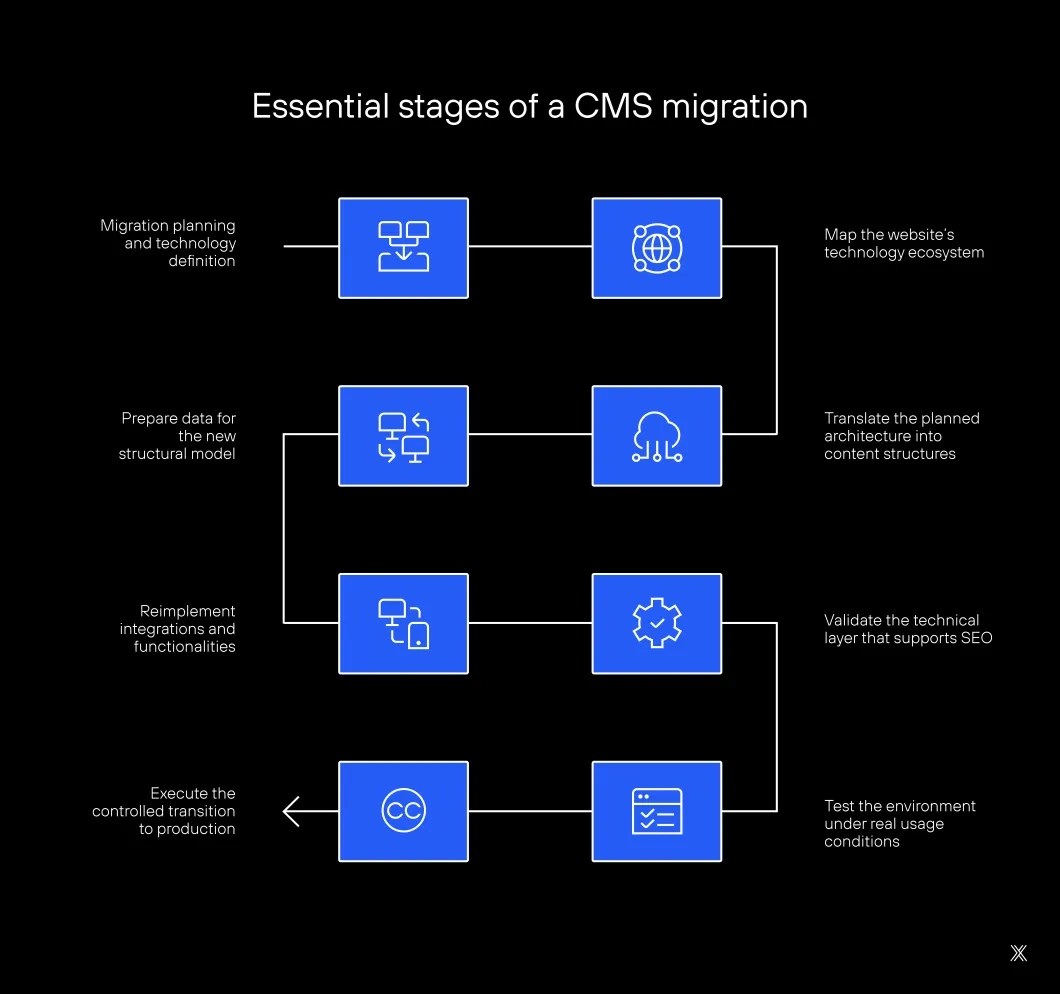
After analyzing the critical technical aspects of a CMS migration—such as application architecture, data structure, integrations, infrastructure, and technical SEO—the project needs to translate this analysis into concrete operational steps.
Below is the practical workflow that connects technical decisions to project execution.
1. Migration planning and technology definition
Before starting any operational phase, the migration must go through a technical planning stage and definition of the technology stack. Requirements related to scalability, content governance, integrations, data architecture, and editorial operations are evaluated.
This is also the stage where the CMS is selected, the infrastructure is defined, and the tools that will compose the ecosystem are chosen, such as deployment pipelines, search systems, personalization services, and marketing platforms.
2. Map the website’s technology ecosystem
The first operational step is to transform the technical diagnosis into a functional map of the digital ecosystem. This means identifying which systems interact with the CMS, what data flows exist, and which features depend on these connections.
3. Translate the planned architecture into content structures
After defining the new CMS architecture, it must be materialized within the platform through content types, structured fields, taxonomies, and entity relationships.
4. Prepare data for the new structural model
Existing content must be adapted to the new structure through field normalization, taxonomy reorganization, metadata review, and media library adjustments.
5. Reimplement integrations and functionalities
The team reestablishes connections with APIs, enterprise systems, and validates data flows.
6. Validate the technical SEO layer
Redirects, URL structures, metadata, and indexation elements are reviewed to ensure SEO preservation.
7. Test the environment under real conditions
The system is tested for stability, performance, integrations, and content consistency.
8. Execute a controlled production transition
The domain is pointed to the new CMS, followed by continuous monitoring of logs, performance, and traffic behavior.
Where Do CMS Migration Projects Usually Fail?
Most failures in CMS migration projects do not happen during the transfer of pages, but rather in the structural layers that support digital operations. When architecture, data, and editorial workflows are not handled in an integrated way, technical and operational regressions emerge—often only becoming visible after launch.
The most common issues are typically concentrated in the following areas:
→ Incomplete mapping of the technology ecosystem: failures occur when integrations with CRMs, automation tools, search engines, corporate APIs, and authentication systems are not fully documented. Hidden dependencies are only discovered after go-live, causing disruptions in data flows, forms, or system synchronizations.
→ Content modeling inherited from the previous CMS: replicating the same content structure from the legacy system preserves architectural limitations. Without revisiting the content model, the new CMS remains dependent on rigid templates, poorly reusable fields, and limited editorial autonomy, making future evolution difficult.
→ Inconsistencies in asset and metadata migration: media libraries, internal links, and metadata often depend on CMS-specific internal references. When these relationships are not normalized before migration, issues such as orphaned assets, broken links, or loss of editorial context can arise.
→ Breakdown of SEO structure and technical indexation: changes in URLs, canonicals, headings, metadata, and sitemaps can directly affect crawlability and indexation. Even minor inconsistencies can result in a drop in organic traffic and loss of authority for previously indexed pages.
→ Misalignment between technical architecture and editorial operations: when modeling and governance decisions are made solely by technical teams, the CMS may function correctly from a system perspective but still create bottlenecks for marketing and content teams—especially in approval workflows, page creation, and component management.
How Long Does a CMS Migration Take?
The time required for a CMS migration varies significantly depending on the size of the digital ecosystem, the volume of content, and the number of integrations involved. In smaller projects, with few templates and a limited number of pages, the process can be completed within a few weeks. In enterprise environments, however, timelines tend to be considerably longer.
The main reason is that migration does not involve only content transfer. It includes technical diagnostics, architectural modeling, integration rebuilding, testing, and operational validation. Each of these stages requires planning and coordination across different areas of the organization.
In general, timelines fall into three main ranges:
Small or simple institutional websites: projects with few pages and minimal integrations typically take between 3 and 6 weeks.
Mid-sized projects: websites with dozens or hundreds of pages, basic integrations, and some level of customization usually require between 8 and 12 weeks.
Complex enterprise environments: large institutional portals, multisite ecosystems, or environments with critical integrations may take between 3 and 6 months or more, depending on architectural complexity and content volume.
Beyond website size, several factors directly influence the project timeline. Among the most relevant are the number of external integrations, the need to redesign the content model, the organization’s editorial governance structure, and the level of customization of the previous CMS.
For this reason, in enterprise projects, timelines are rarely defined by the number of pages alone. What truly determines the duration of a CMS migration is the level of dependency the website has on the broader digital ecosystem of the organization.
Talk to a specialist and run a diagnostic
Main Platforms Available in the Market
The CMS market has evolved significantly in recent years. Today, platforms are divided into traditional CMS, headless solutions, and digital experience platforms (DXPs). Each approach addresses different needs, from simple institutional websites to complex digital ecosystems with multiple channels and integrations.
Among the available options, some platforms have established themselves as references by offering scalability, architectural flexibility, and integration with enterprise technology stacks.
1. Drupal
Recognized for its architectural flexibility, security, and high level of customization, Drupal is widely used in corporate portals, government websites, and projects that require granular permission control and multiple content types.
2. WordPress
The most popular CMS in the world, powering a large portion of websites, especially institutional sites, blogs, and mid-sized projects. Its popularity comes from ease of use, a vast plugin ecosystem, and an active community.
3. Framer
A modern platform focused on website creation with emphasis on design, performance, and publishing speed. Commonly used by startups and digital companies, it combines an advanced visual editor with optimized site generation and marketing integrations.
4. Adobe Experience Manager (AEM)
One of the leading enterprise platforms on the market. It integrates content management, digital asset management, and marketing tools within the Adobe Experience Cloud ecosystem, making it widely adopted by large organizations and omnichannel operations.
5. Sitecore
An enterprise platform focused on digital experience personalization. It offers automation tools, content management, and integration with customer data, making it suitable for companies with advanced digital marketing strategies.
6. Contentful
A widely used headless CMS in modern architectures. It enables structured content management and distribution via APIs across websites, applications, and digital devices.
7. Kentico Xperience
A hybrid platform that combines CMS capabilities with marketing automation and digital experience features. It is adopted by companies seeking to integrate content management with relationship and personalization strategies.
How to Choose the Ideal CMS for Your Digital Architecture?
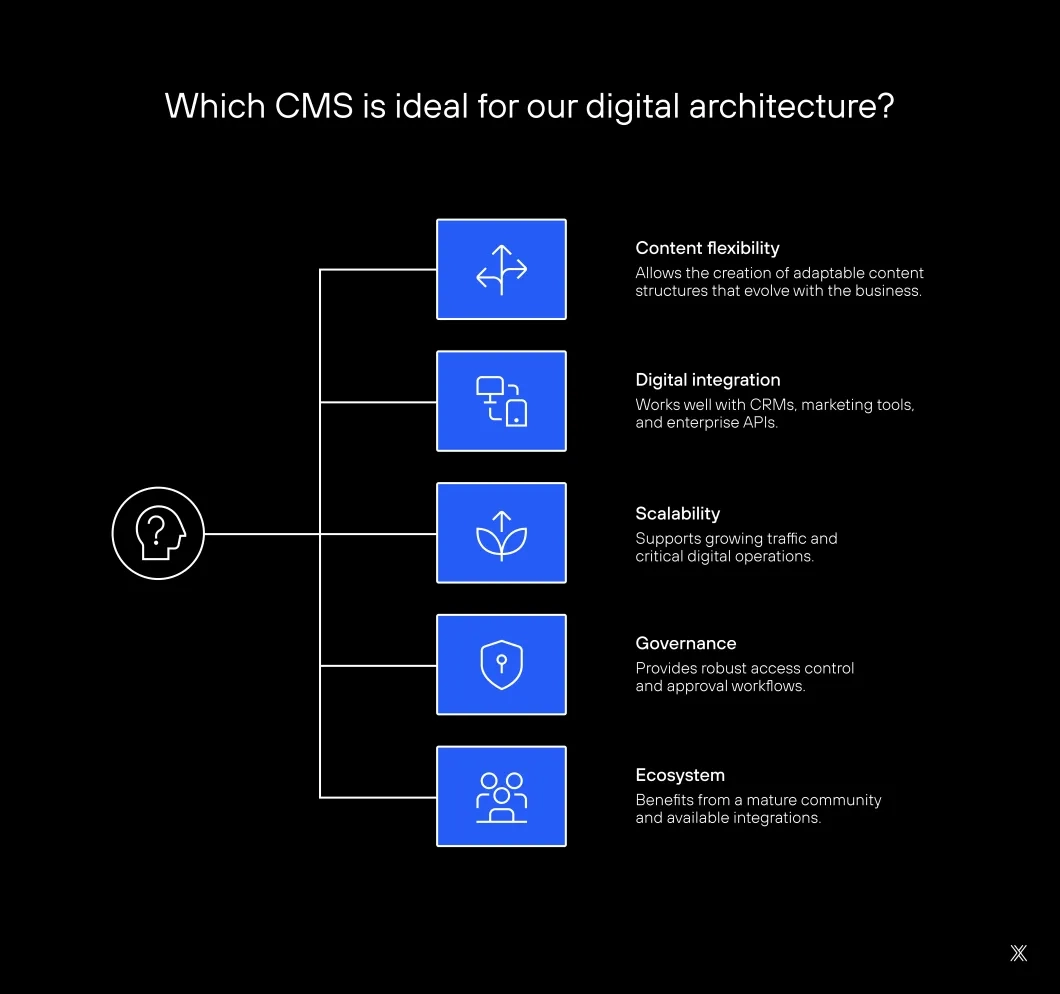
Choosing the target platform is one of the most critical decisions in a CMS migration project. Rather than evaluating isolated features, it is essential to understand how the CMS fits into the organization’s overall technology architecture.
Some key criteria help guide this decision:
Content modeling flexibility: the CMS should allow the creation of adaptable content structures, with content types, taxonomies, and relationships that can evolve over time;
Integration capabilities with the digital ecosystem: modern platforms must operate effectively within connected environments involving CRMs, marketing tools, data systems, and enterprise APIs;
Scalability and infrastructure stability: corporate websites require environments capable of handling traffic growth, multiple portals, and critical operations without compromising performance;
Editorial governance and permission control: organizations with distributed teams need robust access control, approval workflows, and content versioning mechanisms;
Platform ecosystem and support: the maturity of the community, availability of integrations, and existence of complementary tools also play a key role in expanding platform capabilities.
When evaluated together, these criteria help ensure that the new CMS not only solves current limitations but also supports long-term digital evolution.
CMS Migration in Practice: The Hospital Sírio-Libanês Case
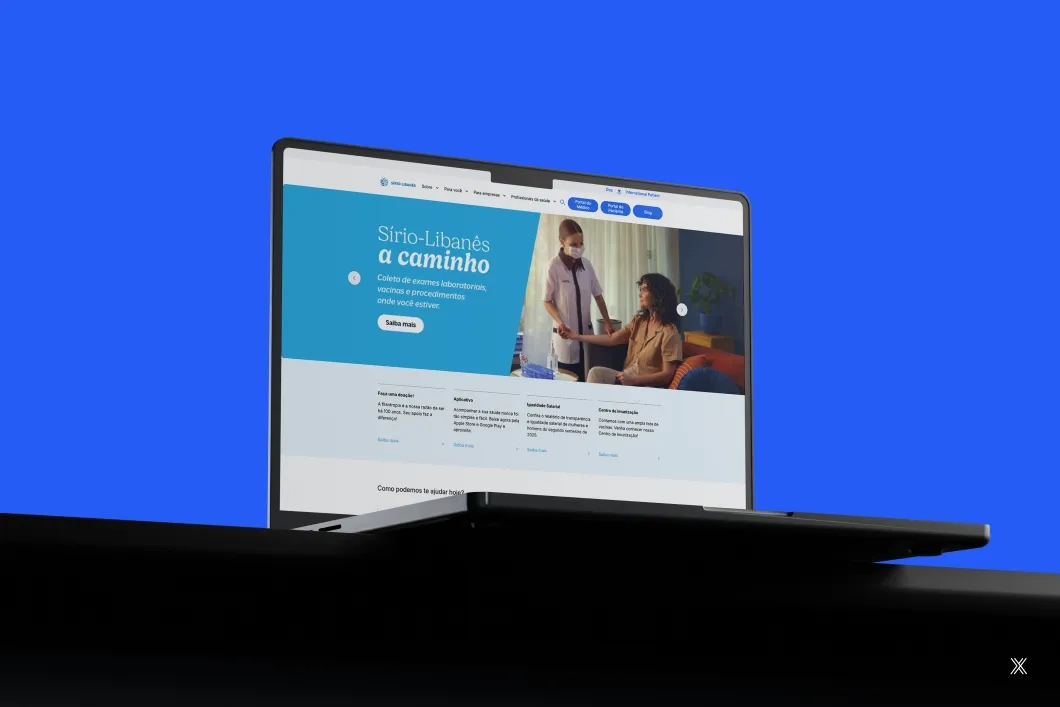
CMS migration projects take on a different level of complexity when they involve critical institutional environments, with multiple portals, complex integrations, and high availability requirements. This was the scenario faced in the digital transformation program of Hospital Sírio-Libanês, one of the most recognized healthcare institutions in Latin America.
Before the migration, the hospital operated with a fragmented content management ecosystem, using Salesforce CMS, Hygraph, and other isolated solutions for different portals and digital initiatives. This architecture increased operational complexity, hindered integrations, and limited editorial team autonomy.
The project involved migrating and consolidating multiple CMS platforms into a unified architecture based on Drupal, adopting a multisite model hosted on Acquia Cloud. The new platform centralized institutional portal management and improved integration with the organization’s broader technology stack.
The architecture implemented by Dexa leveraged tools such as Acquia Site Studio for visual page building and reusable components, Acquia Pipelines for versioning and application deployment, and Acquia Search powered by SearchStax for content indexing. The project also included restructuring critical integrations with enterprise systems, including connections with Salesforce.
Result
In approximately four months, around 2,000 pages were automatically migrated through scripts, and 400 new pages were structured on the new platform, resulting in the delivery of five institutional portals operating within a Drupal multisite architecture. In addition to technological consolidation, the new platform significantly increased editorial team autonomy in content management.
Why Choose Dexa for CMS Migration Projects
CMS migration projects involve digital architecture, system integration, and the preservation of website operations. Dexa conducts these projects with a focus on ensuring that platform transitions occur without loss of performance, traffic, or digital authority.
The company has experience in migrations across different CMS platforms and architectures, including traditional systems, headless solutions, and digital experience ecosystems. Its approach includes technical diagnostics, redirect planning, SEO preservation, and restructuring of critical integrations.
Although highly specialized in Drupal and Acquia environments, Dexa operates broadly in CMS migration projects, always focusing on maintaining platform stability, site performance, and continuity of search engine indexation.
Projects such as Hospital Sírio-Libanês demonstrate Dexa’s ability to execute complex migrations while preserving integrations, performance, and governance across digital operations.
Want to learn how we can support your project? Talk to a specialist.